Beating Broke

Personal Finance from the Broke Perspective

  • Home
  • About
  • We Recommend
  • Contact
  • Privacy Policy

Powered by Genesis

Data Backup on a Budget

December 14, 2011 By Shane Ede 24 Comments

One of the most common things we hear in the computer repair shop that I work part-time in is that the computer has crashed, and could we please make sure to get the data off of the hard drive before we re-install windows.  And, the first question we always ask is, “do you have your data backed up?”  I probably don’t have to tell you what the common answer is to that question.

Many computer users assume that backing up their data is expensive.  We see advertisements for services that cost $40-$50 a month, and for external hard drive solutions that are several hundred dollars.  But, keeping your data safe, doesn’t have to be expensive.  In fact, I’ve got all my important data backed up, and I spend less than $50 a year.  It’s not because I have some inside information, or get favors from tech companies.  You can do it too.  And, if you value your data at all, you should.

This is the set-up I currently use.

Data Backup BudgetPicture Backup

Pictures are one of the top two things that people are concerned about losing when they bring their computers in.  Unfortunately, pictures are also the largest files that you’ll likely have to backup and store.  If you take a lot, you can have Gigabytes of pictures that will need to be backed up. In my set-up, I pay for a full membership to photo sharing site, Flickr.  It’s about $26 a year, and allows for unlimited uploading to the site.  The pictures are then stored on Flickr’s server, and I can get to them whenever I want.  I should note that this isn’t the most elegant solution, as I would have to download the images one-by-one if I wanted to restore them to my local PC.  I’ll go over some more efficient services at the end, but you’ll likely have to spend more money to use them. (See note below: 4/15/13)

Data Backup

For any files that are important, besides pictures, I use a service called Dropbox.  Their basic plan is free, but limits you to 2GB of data storage.  Because I backup my photos elsewhere, I’m able to store everything else that is important with them, and keep the free account.  After several years of using it, I am getting close to the 2GB max, so I may have to upgrade to the next plan up soon.  The first paid plan allows for 50GB, and is only $9.99 a month, so I don’t think I’d ever have to go above that plan.  I should also note, here, that if you have a very large music collection on your computer that you’d like to backup, you’ll likely have to look at a paid plan. (See note below: 4/15/13)

Other options for data backup

There are several other options that you could use for data backup.  The aforementioned external hard drives can be super easy to use.  One drawback to using one, however, is that the data is still physically located in the same place as the PC you’re backing up.  That’s fine if you only need to restore because of PC failure, but can be a disaster if you have to restore due to something like a fire or flood.  Ideally, external hard drives that are used for PC backup should be placed in an off-site location, but since that’s a bit cumbersome and likely to keep you from actually backing up your data, they should be at least placed in a fire-proof safe when not in use.

Another, more ideal way to back your data up, is through a service like Dropbox.  There are a few others that are specifically designed and marketed as data backup services.  Carbonite is probably the most well-known of them, but there is also CrashPlan, and Mozy that do the same job.  Carbonite and CrashPlan come in at $59 a year (about $4 a month), while Mozy comes in at $5.99 a month. Crashplan has a free plan, but it requires you to have your own server to back up to.  This can work out if you have a second computer at another location or have a friend that you trust with your data.  They’ve also got a plan that’s $33 a year, but it limits you to 10GB total storage.

Not backing up your data can be an expensive mistake to make.  Not only can it cost you a lot of money ($100 or more) to get your computer fixed, but you could lose all of your valuable data.  Save yourself the money of having it recovered, and save yourself from losing years of photos and information; get a data backup plan.

Update 4/15/13:

One of the nice things about a disaster recovery backup plan is that you usually don’t have to use it.  More often than not, our computers run on and on until we replace them and we transfer the data to the next machine.  Earlier this week, I had to put my set up to the test.  My main storage hard drive crashed.  While I tried to recover the data from it, it was lost.  With a newly formatted hard drive, I was able to reinstall Dropbox and as soon as it was done syncing, I had all the data that was in Dropbox back on my PC.  The Flickr photo backup was a little bit more cumbersome.  There are several apps out there that you can run that will allow you to download all of your pictures one after the other.  I ended up using one called Flump.  It worked, but the pictures are in one heck of a mess.  None of them have any names, and the structure I had before is lost.  So, I’ve got 7000+ pictures to sort through.  Moving forward, I’ll be adding one of the above back up services (Crashplan or Carbonite) to my PC to back up my file structure and other assorted things.  For the $59 a year it costs, it’s worth the added convenience of not having to deal with the sorting of files and individual applications.

Do you backup your data?  What do you use for your data backup plan?

Original Image Credit:Hard Disc Crash by barnoid, on Flickr

Filed Under: Frugality, General Finance, Home, Saving, ShareMe Tagged With: data backup, data recovery, frugal data backup, Frugality, Saving

DIY Disaster; Or, Our New Deck

December 12, 2011 By Shane Ede 28 Comments

We got a lot of snow last winter.  We get a lot of snow every winter, in fact.  But, last year was exceptional.  If I remember correctly, we had over 80 inches of total snowfall.  Most of it blows around and drifts, so it isn’t all piled up, but, it was still a lot of snow.  And, a lot of snow is heavy.  The deck on our house was built before we bought the house, so it was probably 10 years old, or older.  Late one evening, just before spring, we heard a loud cracking noise come from outside.  I went outside to see if I could find the where the sound came from, hoping it wasn’t a big tree branch (or a whole tree for that matter), to find that part of the deck had sunk about 3 inches below where it was before.  It doesn’t take a construction genius to figure out that that is a bad thing.

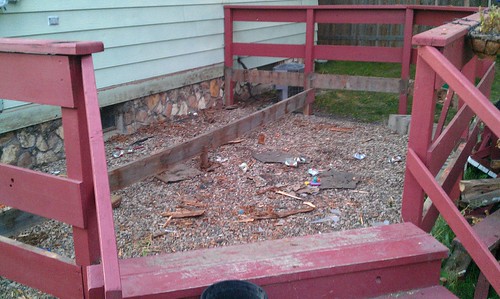
With snow on the deck, it was hard to diagnose exactly what the issue was, so we waited until spring had come and the thaw had gone.  I pulled the first board off of the deck, and found that the sill plate (the board that attaches to the house and supported an entire side of the deck) had given way.  The weight of the snow, combined with the age of the deck and mother nature’s toll on the materials had caused it to break apart in several places.  It wasn’t really safe to use anymore, so we decided to replace the board and all of the decking, leaving the support posts and railing.  We were hoping that by leaving the support posts and railing, we’d save some money on the project.  And, that would have likely been true.  After I had removed all the decking, here’s what we were left with.

Old deck deconstructed

With it torn down to this degree, we were ready to do a little clean up, and start on replacing the decking. So, I got my hammer, and started pulling nails out of the posts and railing. One of the first nails I attempted to pull was a stubborn one. Instead of coming out of the wood, the entire post it was in came up off the ground by about 5 inches. Oh, boy. I went around and tested a few of the other posts, and sure enough, almost all of them were rotted through at the ground level. My affordable deck repair had suddenly become a not-as-affordable deck replacement.

When it was just a deck repair, we had planned on spending about $700 on materials to fix the deck.  When it was all said and done, we spent over $1200 to replace the deck.  Now, had we had a contractor come and do the work, it would have easily cost us twice that, so I won’t complain too much about the cost.  But, when you’re expecting one price, and then end up spending twice that price, it’s a bit of a shock to the system.  At the time, we had the money, so it wasn’t that big of a deal.  Shortly after we started the deck project, we decided to sell the house, so it was going to be a big bonus for selling the house.  Instead of the old rickety deck, we’d have a nice new deck as a selling point. (P.S. attempting to build a new deck while also trying to prepare your house for sale is not the best idea.  Just saying. ) Then, I quit my job.  And we took the house off the market.  So, we get to use the deck ourselves.  Of course, we could use the money we spent on the deck, now, but there’s nothing we can do about that.

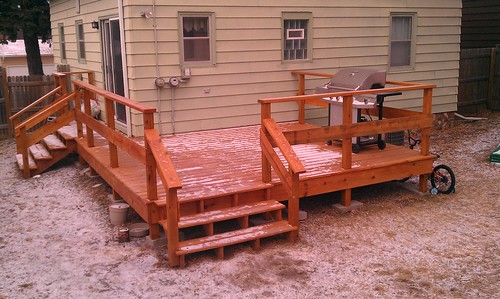
I didn’t keep track of exactly how long it took, but overall, I think it came in at about 4 weeks of nearly every night after work and weekend work to get it finished.  When it was all said and done, this is what we ended up with.

New deck

Note: I realized when planning this post that I hadn’t taken a picture of the finished deck, so I took one, last week.

I think it turned out really well. It’s way more solid feeling than the old deck, and since we redid the whole thing, we got to stain it, rather than paint it that “fun” redwood color that the old deck was. One of the key takeaways here is that while DIY can often save you money, the projects that you take on can sometimes be more way more than you intended to do. Had we hired a professional to do the work, it would have likely cost us way more. Replacing the decking is a pretty easy task that most DIY’ers should be able to tackle, but building an entire deck is a bit more complicated. Several times, I found myself scratching my head, trying to figure out what step I needed to do next. And, I’ve built a deck before! Someone with less experience and know-how might have easily found themselves in a pickle and had to hire a contractor to come in and finish up. It could easily turn into a DIY disaster that costs way more than anticipated. And, if you’ve only got so much budget to go around, like most of us do, even a little bit more can put a crunch on your finances.

Be sure you do as much analysis as you can on the project, and budget for unforeseen issues, before you tackle any major DIY project.  Also, it’s better to have it done right, than have it done cheaply, so if you get in over your head, find a professional to help you.  Many will gladly charge a consulting fee to come and tell you what you need to do next.  Find one that will, or hire one to finish the job so that it’s done right.

What have your DIY disasters been?  Massive budget overages?  Stuff you built fall apart?  Share with us!

Filed Under: Home, ShareMe Tagged With: deck, diy, diy disaster, home maintenance

Have a Holiday Spending Plan: Don’t Dread January

December 7, 2011 By MelissaB 19 Comments

Its beginning to feel a lot like christmasHoliday shopping is in full swing now, and you may be feeling the financial pressure.  Shane recently quit his job and is working on a tight holiday budget.  My husband and I are in the midst of being gazelle intense, so we don’t have much extra money for gifts.  Yet even though we don’t have much money to spend this holiday season, I feel great about what we are giving because we are not overspending.  We can truly afford what we are giving.  Instead of overspending, we are empowering ourselves by spending exactly what we are able to spend.  Follow these tips to rein in your holiday purchases this season:

-Freeze the credit cards.

Literally.  Put them in water and freeze them.  Better yet, put them in peanut butter as we did.  Vow not to use your credit cards this month.  There is nothing worse than opening your credit card statement and staring at the large number you now owe.  The presents have been opened, the holiday is over, but you still owe for the holidays.  If, instead, you put the credit cards away, you have nothing to dread come January.


-Set a budget and fund it with cash.

Determine exactly how much you have to spend and withdraw that money from your bank account.  Pay for every purchase with cash.  Feel the pain as you part from the cash.  Acknowledge what you are spending, and feel empowered that you are sticking to your budget.
If you want to shop online, get a debit card.  Just avoid using credit cards.

-Shop the bargains

There will be plenty of deals to come this holiday season.  Stay focused on the deals and only buy items you can get on sale.  Take advantage of buy one get one free sales such as buy one toy of a certain brand, get the second toy from the same brand free.

-Buy sets

For children, especially young children, buy toys that come in sets such as a baby doll with a stroller and a high chair.  Take those out of the package and break them into three different presents for the price you paid for the bundled gift.

-Look in unconventional locations

My children get presents from Santa and from me and my husband.  Since they were little, the toys that get from us are often gently used.  I shop garage sales throughout the summer and hide gifts away.  This year my three year old will get a new in the box baby doll that I picked up at a garage sale for $3.  My son will get a wooden box with five different games in it that I found at a garage sale for $5.

Obviously you may not have time to go to (or even find) garage sales now, but you can shop children’s resale stores for quality toys at a steep discount.

They say ‘tis better to give than to receive, and that is true more so when what you give is what you can afford.  Why not enjoy watching your family open their presents this Christmas without worrying where the money will come to pay for everything in January.  It is possible.  Beating Broke and I are both proof of that.

photo credit: aussiegall

Filed Under: credit cards, Frugality, Saving, ShareMe Tagged With: christmas, frugal chritsmas, frugal holiday, Holiday, holiday spending, spending

  • « Previous Page
  • 1
  • …
  • 245
  • 246
  • 247
  • 248
  • 249
  • …
  • 317
  • Next Page »
  • Facebook
  • Pinterest
  • RSS
  • Twitter

Improve Your Credit Score

Money Blogs

  • Celebrating Financial Freedom
  • Christian PF
  • Dual Income No Kids
  • Financial Panther
  • Gajizmo.com
  • Lazy Man and Money
  • Make Money Your Way
  • Money Talks News
  • My Personal Finance Journey
  • Personal Profitability
  • PF Blogs
  • Reach Financial Independence
  • So Over Debt
  • The Savvy Scot
  • Yes, I am Cheap

Categories

Disclaimer

Please note that Beating Broke has financial relationships with some of the merchants mentioned here. Beating Broke may be compensated if consumers choose to utilize the links located throughout the content on this site and generate sales for the said merchant.

Visit Our Advertisers

Need to change careers? Consider an Accounting Certificate Program from WTI.